
Set case SLA targets
Set how quickly your team should respond to and resolve a case, by priority.
An SLA is a promise about timing. For each case priority, you set how soon someone should respond and how soon the case should be resolved. solarOS then shows each case's running deadline and flags the ones that are late or due today.
Before you start
You need the Admin or Owner role to change the targets. Other roles that can open Settings can view them.
Steps
- Go to Settings → Operations → SLAs.
- For each priority (Low, Medium, High, Urgent), set Respond by: type a number and pick Hours or Business days.
- Set Resolve by the same way.
- Click Save.
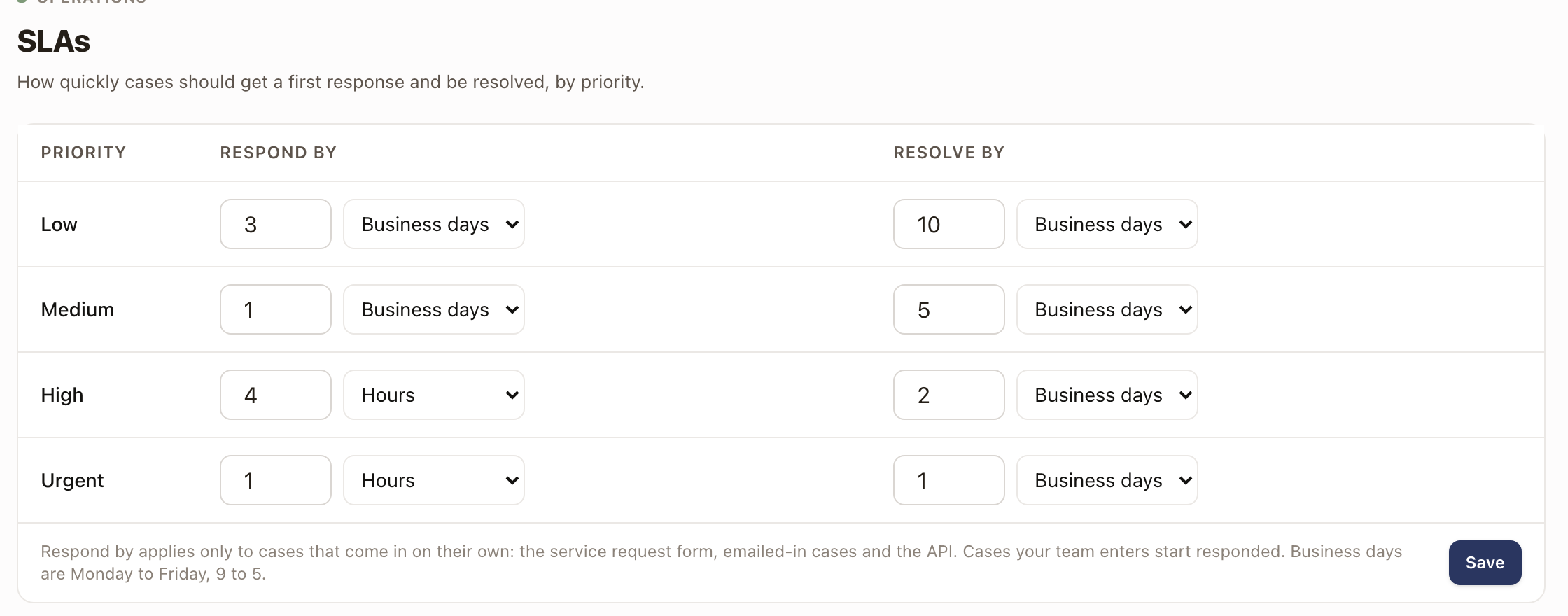
Hours count every hour, including nights and weekends. Business days are Monday to Friday, 9 to 5. Leave a number blank to set no target for that deadline. Targets are whole numbers from 1 to 999.
New targets apply to cases opened from now on.
How the targets are used
- Respond by applies only to cases that come in on their own: the service request form, cases that are emailed in, and the API. A case your team enters starts as already responded, so only Resolve by runs on it.
- A case's first response is recorded when someone logs a call, email, or meeting on it, or clicks Mark responded. Then the Resolve by deadline takes over.
- The clock pauses while a case is in Quote Sent, Awaiting Vendor, or Awaiting Work.
- Changing a case's severity recalculates its deadlines from the targets for the new severity.
Check it worked
Open a case. The SLA field in its header shows Respond by or Resolve by with the date. On Operations → Cases, turn on the SLA column or pick the Due today view to see overdue cases and the ones that run out today. See Work the Cases list and Work a case and close it out.
Common problems
- I can't change the targets. The fields are locked and there's no Save button for roles without access. Ask an Admin or Owner.
- Save is greyed out. A number is outside 1 to 999 or isn't a whole number.
- A case shows no SLA. It's closed, or the priority has no target for the deadline that would run.