
How monitoring works
How a Site's connected devices become production data, how problems turn into Alerts, and how subscriptions fund the ongoing work.
Monitoring watches a customer's solar and battery system after it's installed: how much it's producing, whether its equipment is connected, and whether anything needs attention. It turns problems into Alerts your team can act on, and it's what a monitoring subscription actually pays for.
How it fits together
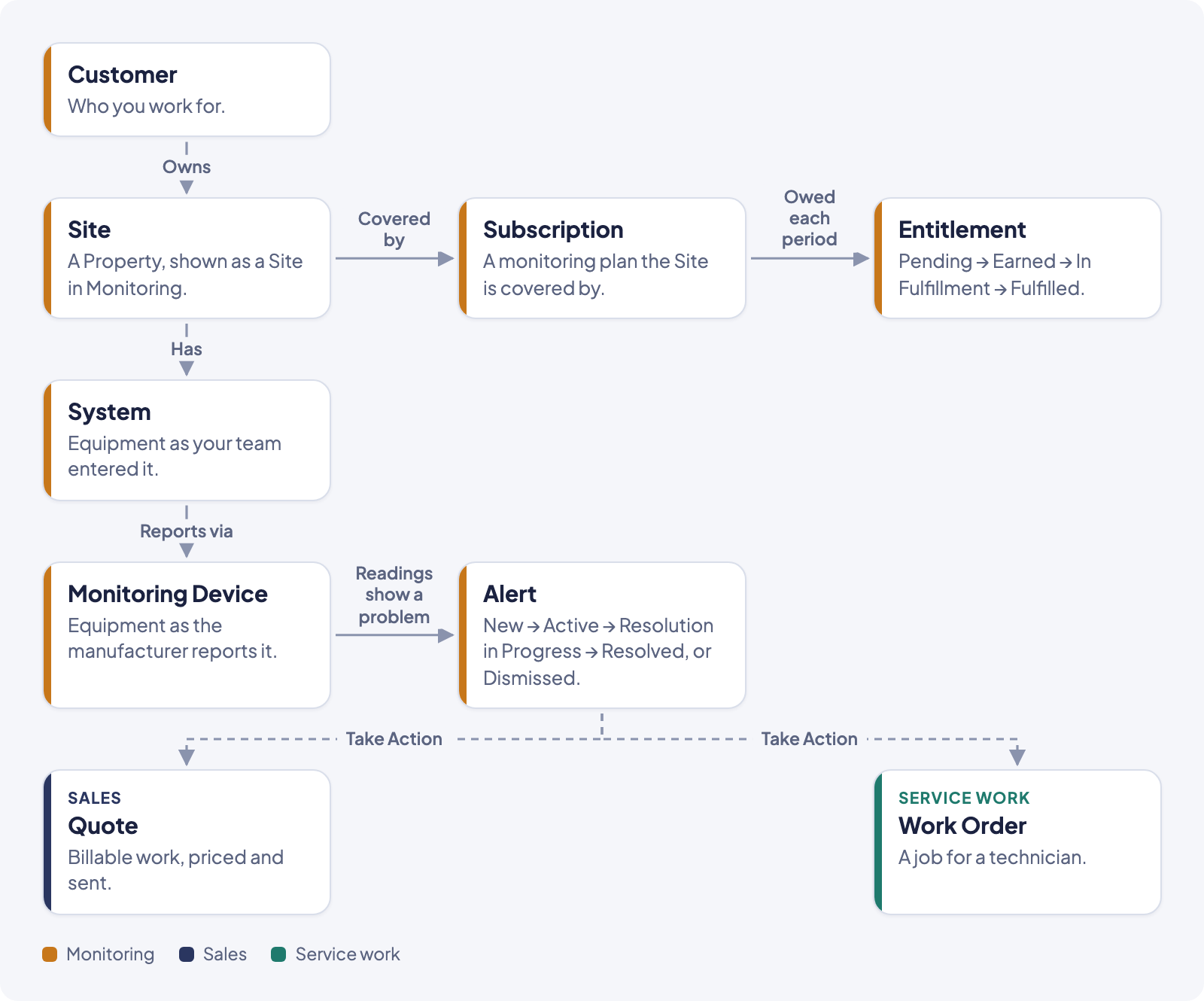
- A Customer's Property is a Site. Everywhere inside Monitoring, a Property is called a Site: same record, different name for this part of the product.
- A Site has a System and Monitoring Devices. The System is the equipment your team entered by hand (panels, batteries, install date). Monitoring Devices are the same equipment as seen by the manufacturer's monitoring account, connected through Texture. Neither one overwrites the other.
- Devices report production. Once connected, a device's readings update about every hour, building the production and battery history you see on the Energy chart.
- A Site needs an active monitoring subscription before its devices can be connected at all. See "How subscriptions and entitlements work together" below.
- Problems become Alerts. When the readings show a real issue (a device goes offline, production drops, a warranty is expiring), solarOS raises an Alert automatically. Nobody creates a health Alert by hand.
- A person decides what to do about an Alert. From Take Action, staff can contact the customer, create a Quote, or create a Work Order. An Alert never creates any of these by itself.
Records and how they connect
- Site: a Property shown in the Monitoring context. Belongs to a Customer.
- System: the equipment record your team maintains (name, type, size, panels, batteries, install date).
- Monitoring Device: one piece of equipment as reported by the manufacturer's monitoring account (Enphase, SolarEdge, Tesla, FranklinWH, or Emporia).
- Subscription: the Site's monitoring plan. An active subscription to a plan that includes monitoring is what unlocks device connection for that Site.
- Entitlement: one promised benefit from a Subscription's plan (for example, an annual inspection), tracked from the period it's owed through to delivery.
- Alert: a problem solarOS found. An Alert marked as an Opportunity shows up on the Insights page instead of the Alerts page, as a possible sale rather than a health issue. It's the same record either way.
Site health and connection, as the screen shows them
A Site's Health is Healthy, At-risk, Needs connection, or Suspended. Its Connection (whether its devices are online) is All connected, Partial, None connected, or Suspended, shown separately on the Sites list.
Alert status
An Alert moves through New, Active, Resolution in Progress, and Resolved, or gets set aside as Dismissed (which can be reopened back to Active). See Read and work an alert for what moves it between these.
How subscriptions and entitlements work together
A monitoring plan is what a customer subscribes to. While that Subscription is active, its Site can connect devices and gets live monitoring. Each billing period, the plan's promised deliverables create new Entitlements that move from Pending to Earned to In Fulfillment to Fulfilled (or Expired if a window closes undelivered, or Voided if the plan ends first). Setting the price and deliverables of a plan, and listing it for sale, happens in Settings → Monitoring setup: see Build a maintenance plan and Get a plan in front of customers.
Guides in this section
- Find and review a site
- Connect a system
- Read and work an alert
- Triage with Command Center
- Work sales insights from your fleet
- Manage monitoring subscriptions
- Fulfill an entitlement
- Gift free months with an offer