
What the homeowner sees on a solar proposalBeta
The proposal page, the PDF, and the email a homeowner receives, and how the plan marked On the proposal shapes them.
When you send a solar quote, the homeowner gets an email with a link to a proposal page and can download the same proposal as a PDF. Read it first, so you know what the homeowner will see. Contact solarOS support to turn solar quoting on for your company.
Preview it
- In the quote builder, open the Proposal tab. It shows a Proposal preview.
- Click Open full page to see it on its own.
The preview hides the accept and signing controls and marks the page as a preview. A notice with Remove placeholder text appears if the quote still has starter wording.
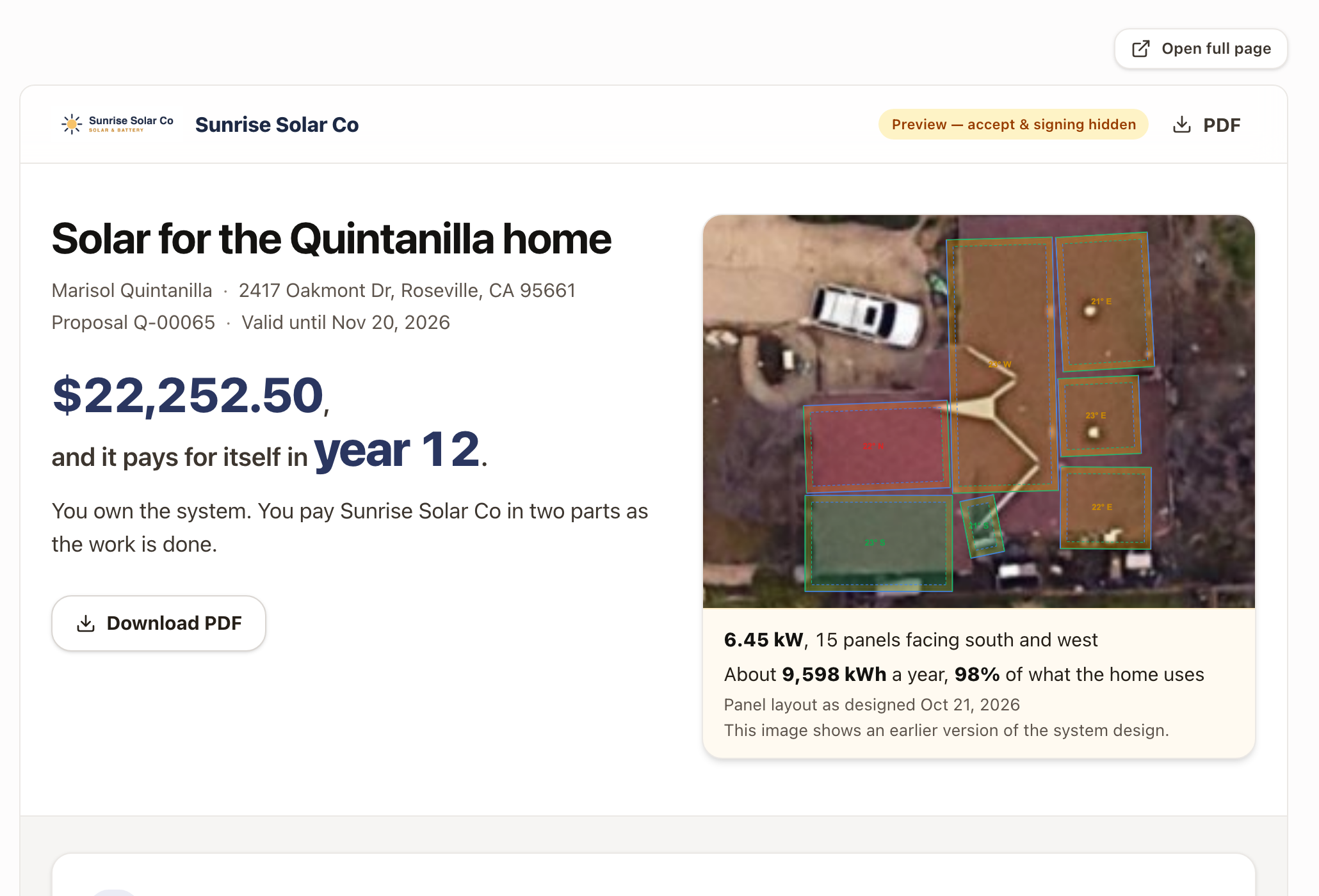
The plan leads
The proposal opens with the plan you marked On the proposal on the Pricing tab. The page, the PDF, and the email all follow it. Change the plan with Use on proposal and the three change together.
| Plan | The opening line says |
|---|---|
| Cash | The price, and the year the system pays for itself. If the payment schedule has two or more cash payments, it says how many parts you pay in. |
| Loan | The cash paid, or $0 down, then the monthly payment, the term, and the APR. |
| Lease | $0 down, the monthly payment, and the yearly increase if there is one. It says who owns the system. |
| Power purchase agreement | $0 down, the monthly amount as a first-year average, and the rate for each kWh the panels make. |
| Prepaid plan | One payment up front, or the loan payment if a loan pays for it. |
What is on the page
- The cover. The title, the homeowner's name and address, the quote number, and the Valid until date. A picture of the panel layout sits beside the plan, with the system size, panel count, yearly production, and the share of usage it covers. A note says when the picture shows an earlier version of the design.
- Your monthly cost, before and after. The first-year monthly bill now and with solar, the monthly saving, and a sentence on payback and 25-year savings. A line says which rate the bill with solar is figured on. Bill, month by month opens the detail.
- What goes on your roof. The equipment, its warranties, and what the panels make month by month.
- From signing to switching on. The steps from acceptance to turn-on, with the payments tied to each, and what the homeowner pays each month once the system is on.
- Accept this proposal. A checkbox and a typed or drawn signature. After acceptance the card shows the date, and the PDF link stays.
- How these figures were worked out. The rates, export credit, interconnection year, rate increase, and panel fade the numbers assume. A line says no federal tax credit is included for a homeowner-owned system.
- The footer. Your company name and your contractor license numbers.
The questions line under the accept card names the quote's owner, the salesperson, with a phone number and email. Without one, it names the company.
The PDF and the email
Download PDF appears on the cover and in the top bar. The PDF follows the same plan and carries the same figures. The email greets the homeowner and gives a short summary: How you pay, System, and Valid until, with the link to the proposal. You see it as the preview when you click Continue to email in Build a solar quote.
Check it worked
- The plan on the proposal preview matches the plan tagged On the proposal.
- The send review shows the same plan, price, and monthly bill as the preview.
Common problems
- The proposal shows the wrong plan. Click Use on proposal on the plan you want, then reopen the preview.
- The preview is blank or says it can't load. Click Try again. Creating the preview link needs permission to edit the quote.