
Change an Originator
See who gets credit for bringing in a sale, change it, and find records by Originator.
The Originator is the team member credited with bringing a sale in, such as the person who took the first call or set the appointment. Every lead, opportunity, and quote has one. Change it when the wrong person has the credit.
The Originator is not the Owner. The Owner works the record. Changing one doesn't change the other.
Before you start
You need a role that can reassign that kind of record. By default that is Owner, Admin, Sales Manager, and Operations Manager. With any other role you see the Originator's name but can't click it.
A custom role needs Reassign Lead Owner for leads, Reassign Opportunity Owner for opportunities, and Reassign Quote Owner for quotes.
Steps
- Open the lead, opportunity, or quote.
- In the Details card, click the name beside Originator.
- Under Change Originator, pick the person. Type in the search box to narrow the list.
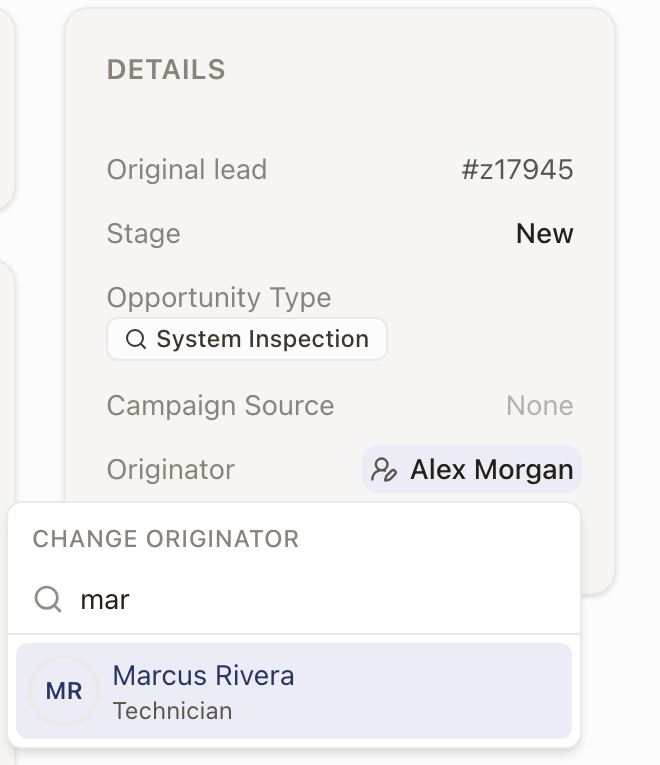
Check it worked
The Details card shows the new name and a message reads Originator updated. The Owner stays as it was.
How an Originator is set
- A new lead or opportunity starts with you as the Originator. Pick someone else in the Originator field if a colleague brought it in. See Create a lead and Create an opportunity.
- An opportunity made by converting a lead keeps the lead's Originator, whoever converts it. See Convert a lead.
- A quote starts with its opportunity's Originator. A quote with no opportunity, such as one started from a case, starts with the person who creates it. See Create a quote.
After that, each record keeps its own Originator. Changing a lead's Originator doesn't change the opportunity made from it, and changing an opportunity's doesn't change its quotes.
Find records by Originator
The Leads, Opportunities, and Quotes lists each have an Originator column right after Owner. If you don't see it, turn it on from Columns.
To see only the records one or more people brought in:
- Click Filter.
- Under People, choose Originator.
- Pick one or more people.
The filter stays when you save a view.
Common problems
The Originator is a name with nothing to click. Your role can't reassign that kind of record. Ask an Owner or Admin to change it for you.
The person I want isn't in the list. The list shows active team members only. A deactivated person can't be chosen.