
How service work works
How a customer problem becomes a Case, then a Work Order, and moves through to a closed, billed job.
Service work covers everything that happens after a system is installed: a customer calls in with a problem, a technician goes out to fix it, and the office closes the job out. This section covers Cases, Work Orders, RMAs, and Material Orders. Scheduling the visit and the technician's phone app are covered in their own sections.
The spine
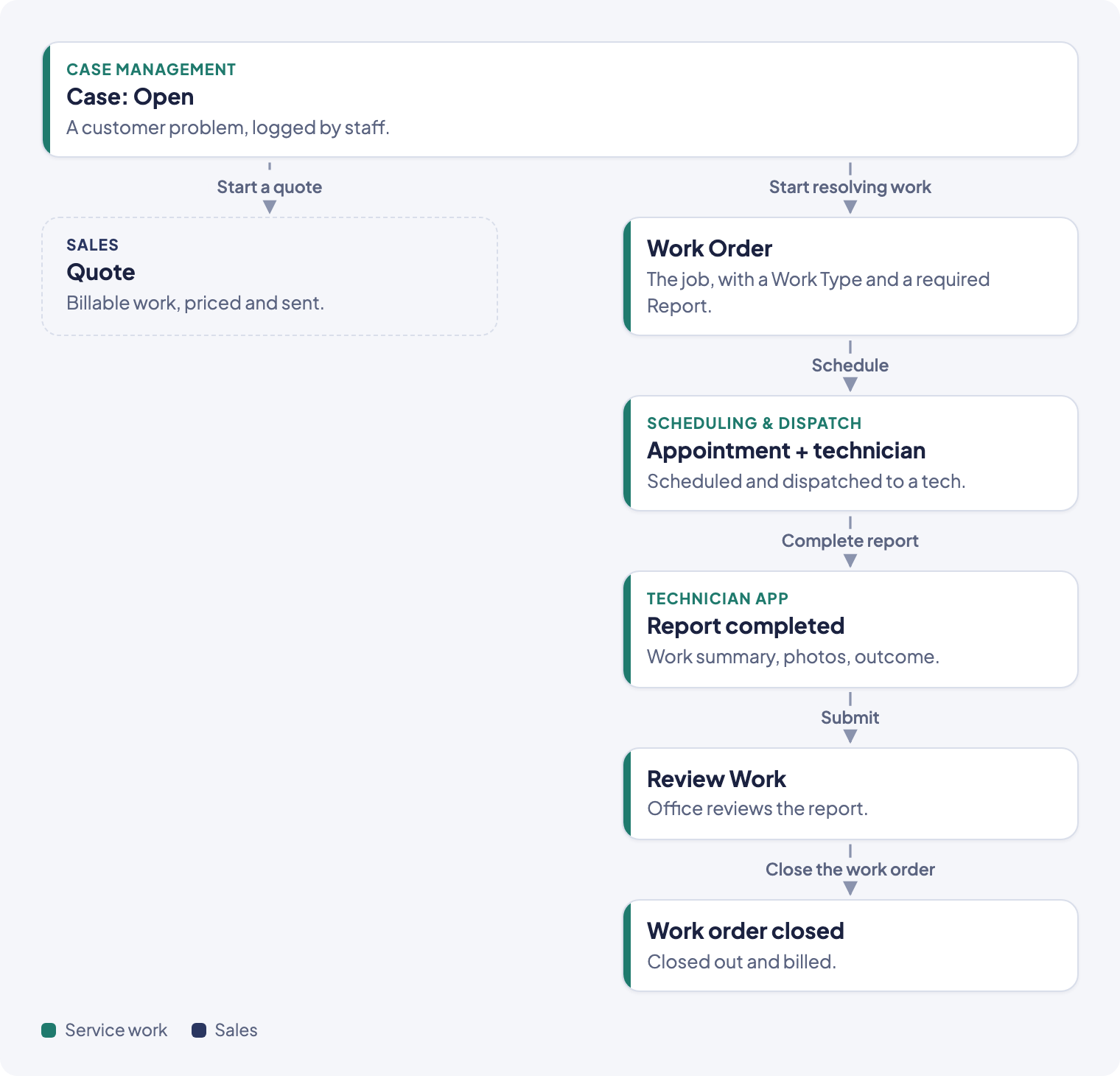
- A Case opens. Staff log a customer's problem as a Case: who it's for, what's wrong, how urgent it is.
- The Case is worked. An owner claims it and moves it forward. From the Case, staff can Start a quote (send the customer a priced quote through Sales) or use Start resolving work to create the Work Order directly, for warranty or no-charge repairs.
- A Work Order is created, either from the Case or on its own. Its Work Type sets the scope, the estimated hours, and the report the technician will have to fill in.
- A visit is scheduled against the Work Order, with a technician assigned. See Scheduling & dispatch.
- The technician completes the visit from their phone: they work through the job and submit a report. See the Technician app.
- The office reviews the report in Review Work. Each finished work order moves through four stages there: Visit, Review, Follow-up, and Billing. The office reads the report, books any follow-up work, and bills what the work earned. The job leaves Review Work when all four stages are done.
- Along the way, a broken part can become an RMA (an equipment return or replacement), and materials the technician needs can become a Material Order.
Records and how they connect
- Case: the customer-facing problem. Belongs to a Customer and Property. Can link to a Project, an Opportunity, one or more Quotes, and one or more Work Orders.
- Work Order: the job a technician does. Belongs to a Project, has a Work Type, and requires a Report. Can carry a Block (something stopping it from moving forward), Material Orders, and RMAs.
- Report: the technician's write-up of a visit: what they found, what they did, photos, and an outcome.
- RMA: tracks a piece of equipment out for warranty replacement, from request through return.
- Material Order: tracks parts ordered for a job, from pending through received or picked up.
Case status
A Case's status shows on its detail page: Open, Triaging, In Progress, Quote Sent, Awaiting Vendor, Awaiting Work, or Closed. Quote Sent happens automatically when the first quote is sent from the case. Awaiting Work happens when resolving work starts, or when an accepted quote from the case creates work. The rest, staff move by hand. The case's SLA clock pauses in Quote Sent, Awaiting Vendor, and Awaiting Work. See Work a case and close it out.
Work Order status
A Work Order's status shows as a strip on its detail page: Not Ready, Ready to Schedule, Scheduled, In Progress, Completed, with Blocked as a side-state and Canceled as a separate exit. See Work order statuses and blocking.
Guides in this section
- Open a case
- Work the Cases list
- Work a case and close it out
- Merge duplicate cases
- Create a work order
- Work order statuses and blocking
- Work a work order from its side panel
- Find and work with reports
- Review submitted reports
- Require payment, or show unpaid invoices, when you send a report
- Close out finished work
- Create and track an RMA
- Order materials for a job