
Monitoring connections
How customer solar systems get connected, and what your team can see about it.
There's nothing for your team to connect for monitoring. Each customer links their own solar system's account from their own portal, and solarOS pulls in the production and device data from there.
What the customer does
From their portal, a customer connects their Enphase, Tesla, or SolarEdge account (some FranklinWH and Emporia devices are also recognized once connected). See Connect a system for the customer-facing steps.
What your team sees
Settings → Operations → Connection health is a read-only fleet view: it shows how many subscribers are set up, how many are fully connected and Ready, and how many Need Attention, with a row per customer showing their Connection state (All connected, Partial, or None connected) and specific readiness issues, for example a missing customer account, provider access that isn't set to monitoring, or stale telemetry.
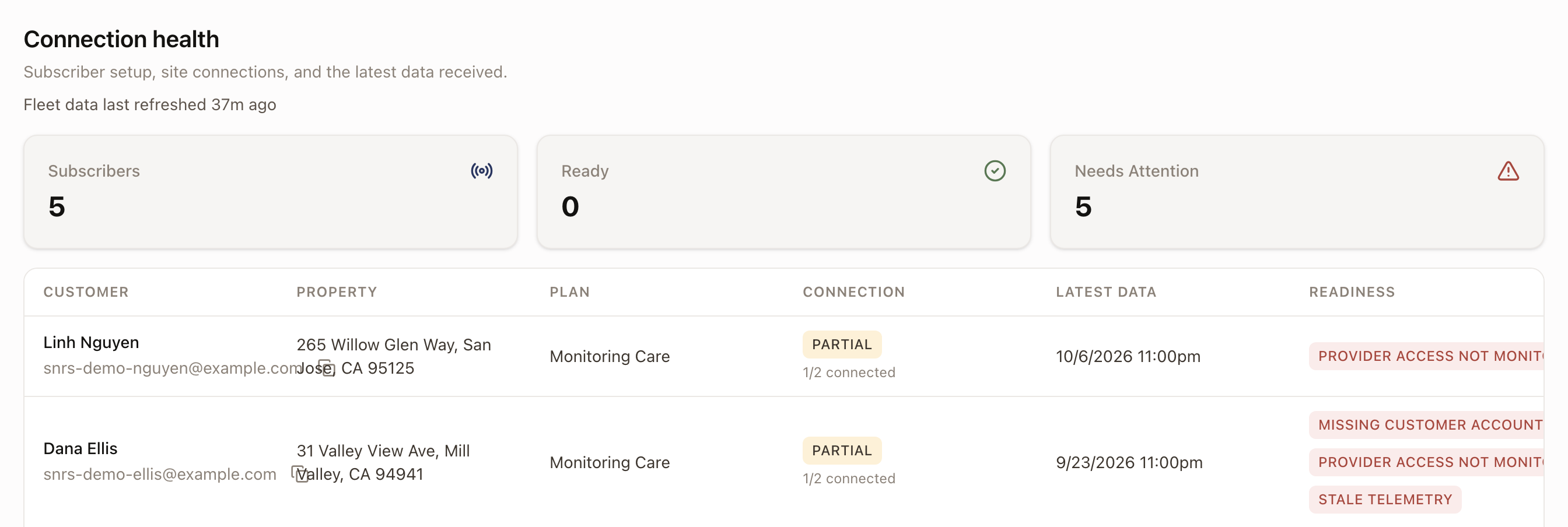
There's no connect action on this page. To help a customer finish connecting, see Connect a system.
Common problems
A customer shows as connected but "Needs Attention." Check the row's readiness column: a customer can have their devices connected while something else is still missing, for example their provider access isn't set to monitoring mode, or their latest telemetry is stale.